
OUR SERVICES
Eagle PCB
EAGLE PCB (Printed Circuit Board) is a widely used electronic design automation (EDA) software developed by Autodesk. It’s used for designing and creating schematics, laying out printed circuit boards, and generating manufacturing files for producing electronic devices.
EAGLE allows engineers, designers, and hobbyists to create detailed electronic schematics by placing components and connecting them with wires or traces. Once the schematic is designed, the software provides tools to design the physical layout of the PCB, including placing components on the board, routing traces to connect them, and defining the board’s dimensions and shape.
About EAGLE
“Developed by CadSoft for many years, EAGLE was later acquired by Autodesk in 2016. Currently, EAGLE has been fully integrated as a core component into the Autodesk Fusion 360 platform, tightly combined with its electronic circuit design tools.”
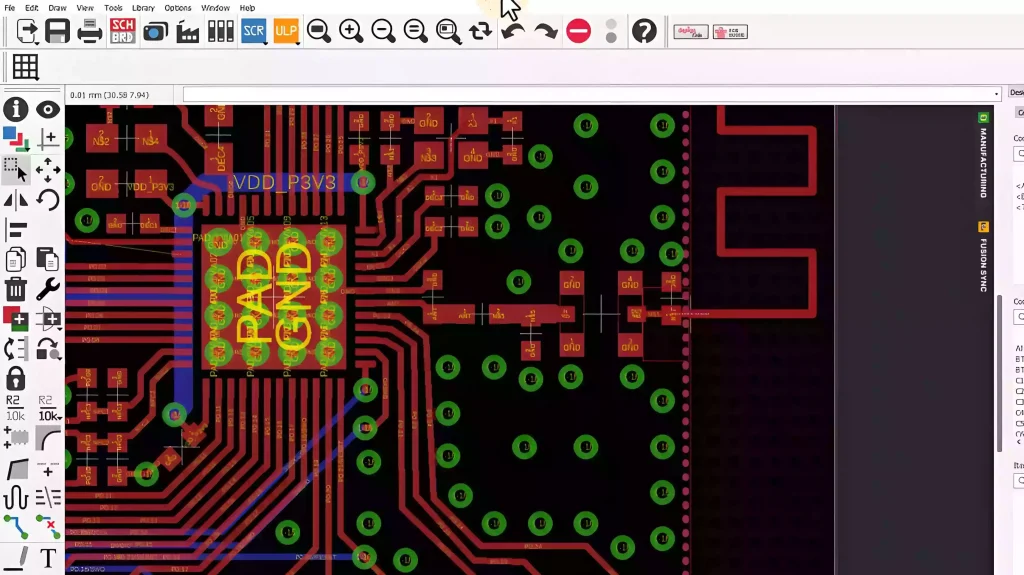
Core Features & Workflow
EAGLE integrates all the core functions required for electronic design, covering the entire process from circuit design to the output of manufacturable files.
Schematic Editor:
- This is the starting point of the design flow. By calling the required components from the component library and wiring them together in the schematic editor, you complete the functional design of the circuit.
Layout Editor:
- Once the schematic is complete, you can generate and switch to the PCB layout editor with one click. Here, you need to place the components within the board outline and plan the copper connections (i.e., routing) between the components.
Library Editor:
- It provides a vast official component library, while also allowing users to create and modify custom component symbols and footprints. Furthermore, community users often share their own libraries, providing convenience for commonly used parts.
Design Rule Checks (DRC/ERC):
- It provides Electrical Rule Check (ERC) and Design Rule Check (DRC) to verify whether the design contains logical errors and to ensure that the PCB layout meets the electrical and mechanical requirements for manufacturing.
Autorouter:
- After the user completes component placement, EAGLE’s built-in router automatically completes the connections based on the defined rules. On multi-core processors, users can even run multiple routing configuration jobs simultaneously and select the optimal result from them.
Output Generation:
- Once the design is finished, it can generate the standard file formats required by PCB manufacturers with one click, such as Gerber files (which describe the image of each layer of the circuit board) and NC Drill files (which describe drilling locations), for production manufacturing.
3D Modeling & Simulation:
- Thanks to deep integration with Fusion 360, it can generate accurate 3D models from the 2D layout. Furthermore, users can integrate this 3D PCB model with its external enclosure and other mechanical components for co-design within Fusion 360, perform early thermal and structural stress analysis, and run SPICE simulations to verify circuit functionality in advance.
Comparison with Other Mainstream Software
EAGLE has a clear positioning within the PCB design software ecosystem, with distinct differences from the two mainstream software packages.
| Comparison Dimension | EAGLE | KiCad | Altium Designer |
|---|---|---|---|
| Core Positioning | The entry-level choice for hobbyists and startup teams | The top choice for budget-conscious open-source ecosystems | The industry standard tool for complex, professional designs |
| Cost | Paid | Free | Expensive professional license |
| Advantages | Seamless integration with Fusion 360, easy to learn, provides a large community library | Completely free, powerful features, active community, continuous updates | Most comprehensive features, powerful simulation, real-time 3D visualization, professional team collaboration, efficient library management |
| Disadvantages | Commercial tool requires payment, free version has limited features | Some advanced features may require manual configuration, slightly less mature in certain high-speed design scenarios | Extremely high cost, steep learning curve |
Summary
In summary, EAGLE is a fully-featured and easy-to-learn PCB design software. It is particularly suitable for electronics enthusiasts, educators, startup teams, and projects that require close integration with mechanical design. Its deep integration with Fusion 360 provides a unique, end-to-end solution for electronic and mechanical co-design.
Need Eagle PCB Service?
Ready to elevate your PCB projects? Dive into the world of Eagle PCB and unleash your creativity. Don’t miss out on the chance to bring your electronic innovations to life – start using Eagle PCB today and see the difference for yourself.